

Today, you will see that many technologies and platforms are capable of seamless web development. So, sometimes, choosing the perfect framework can be a difficult task. Hence, to work in an easier way than ever, you can choose Blazor. It is an efficient web framework which allows you to use the same thing for both your back-end and front-end tasks.
With this, expert developers can build web apps using their existing C# skills. Also, they can use codebase from some other .NET platforms. All these can easily eliminate the need to hire separate teams for non-web and web-development-related tasks.
So, if you are trying to explore the capabilities of Blazor app development services, then you have to know some important facts. So, let’s see.
What is Blazor?
It is an efficient web framework and is built by Microsoft. It can enable your developers to build some web applications that are highly interactive and efficient. Also, they can do it just by using C# rather than using JavaScript. In fact, Blazor can give you a design that is component-based. Thus, your professionals can create applications just by assembling some reusable components. All those components can be easily combined can build some really complex user interfaces.
By using Blazor, you can create some components just with HTML and C#. Also, you can reuse them to build some more web applications.
Some other important features of Blazor are dependency injection and data binding. All these make it very easy to create an efficient, full-featured application with minimal code. With Blazor, developers can enjoy the freedom of choice by running on both the browser as well as the server.
In fact, in Blazor, you will see two types of hosting models. Those are:
1: Blazor WebAssembly
It allows your application to use an element called WebAssembly. Thus, you can directly run your app in the browser of your user. Actually, WebAssembly is a binary instruction format. The Blazor WebAssembly is an ideal tool for developing progressive web apps, along with offline applications. Also, this application logic can communicate with both server-side services and APIs. Moreover, you can also operate it on the client side.
2: Blazor Server
In this model, the C# code of your application can run on the server. Also, the updates regarding the user interface are sent to your clients through SignalIR. SignalIR is actually a real-time communication library. This Blazor development Server is perfect for those applications that need real-time updates. Also, it can effectively leverage server-side resources.
Hence, by using Razor syntax and C# developers can now easily create some user interface components that are reusable. They just have to use Blazor’s component-based architecture. The components of Blazor can work effectively when you need to create some interactive and complex web applications. The reason is that they can easily manage data binding, user interactions, UI rendering, and more.
Why Choose Blazor?
The web framework called Blazor can offer some amazing features as well as benefits. All those can make it an attractive option for you whenever you want to develop some online apps. Some of those primary features and benefits are:
- Razor Syntax: For defining components properly, Blazor uses Razor syntax. It is actually quite familiar to professional ASP.NET developers. These elements together can easily simplify the task of creating some dynamic web content.
- Integration with the Ecosystem of .NET: Experts created Blazor on top of .NET. Also, it can seamlessly integrate with the extensive ecosystem of .NET. This usually includes efficient tools, frameworks, libraries, etc. Hence, all these can make it easier to use existing expertise and resources.
- Real-Time Communication: In the Blazor server, SignalIR supports real-time communication. Thus, developers can easily opt for the best approach for their specific project needs.
- Component-Based Architecture: Blazor can promote an architecture that is component-based. With this, developers can create and then reuse UI components. All those together can easily improve the maintainability and modularity of your code.
- Unified Development: Just by choosing Blazor, developers can use C#. It is a highly popular and strongly typed language. It is also perfect for both server-side and client-side code. Thus, it can easily allow a more unified as well as consistent development experience.
- Data Binding: Blazor can offer data binding capabilities. Thus, you can easily synchronize data between the client and the server. Also, if necessary, you can even update the user interface.
- Cross-Platform Support: Blazor can support multiple platforms. Those may include mobile devices, web browsers, and also desktop apps. Thus, it has become a versatile option for remarkable cross-platform development tasks.
- Reusability of Components: You can easily use and reuse Blazor components across various parts of an application. This can eventually improve the reusability of code. Hence, it can also reduce development time.
- Tooling Support: Many efficient development tools support Blazor. Such as Visual Studio Code and Visual Studio. These also have extensions that can build some responsive and fast web apps.
- Security: Microsoft created this framework for strong security. It includes the best practices as well as security features of ASP.NET and .NET. Thus, it can build some highly secure apps.
So, these benefits will always encourage you to choose Blazor App Development Services. Thus, a report says that Blazor is now used by 36,140 live websites.
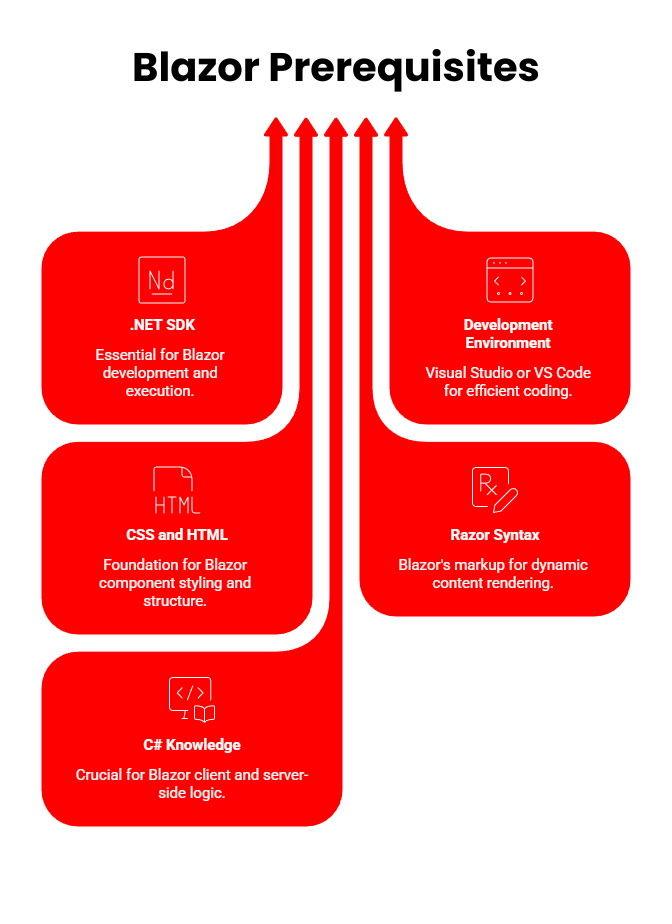
Prerequisites of Blazor
To start with Blazor properly, you must know some important prerequisites. Here is a list for you:
- .NET SDK
Don’t forget to make sure that you have already installed the .NET SDK on your development machine. You can download it from the official website of .NET.
- Development Environment
- Code Editor: Your developers can choose to use Visual Studio or even Visual Studio Code. Both are quite popular and have some amazing features.
- Operating System: Blazor is supported by all notable Operating systems. Those can be macOS, Windows, and also Linux.
- CSS and HTML
Choose those developers who have knowledge on CSS and HTML. Thus, they will be able to use Blazor without any hassle.
- Razor Syntax
It is a markup syntax. In Blazor, it is used to define components, along with rendering dynamic content.
- Knowledge in C#
A good idea of C# language will be useful. The reason is that Blazor uses this language for both client and server-side coding.
Hence, now you know that to work with Blazor efficiently, you have to follow some rules and use some important components. Only then can you enjoy the benefits of Blazor in this era of modern mobile app development.
Moreover, with the right methods of using Blazor will allow you to enjoy the remarkable Blazor Future of Web app development.
FAQs
What Does Blazor Mean?
Blazor actually stands for a combination of two words. Those are Browser and Razor.
What Do You Know About Blazor Lifecycle?
The web applications of Blazor are composed of some independent components. They can easily respond to user interactions, just like Blazor Server.
What Do You Know About Blazor vs. React?
Both are efficient frameworks for creating some remarkable web apps. However, React is a library of JavaScript. In contrast, Blazor framework uses both Razor syntax and C# language.
Adit Sheth
Adit Seth, CTO of Virtual Coders, is an accomplished engineer focused on software development and emerging technologies. His articles cover innovative coding practices and tech advancements, aiming to educate and inspire readers in the digital landscape.

Search
Recent Post
Building Reusable UI Components in Blazor: A
- 2 hours ago
- 7 min read
How Full-stack Developers Can Save a Project
- 4 days ago
- 8 min read
What Factors Influence the Cost of Web
- 7 days ago
- 7 min read